Answers from the documentation; checking which model is on duty
Hi - I answer from the OpenSmartRoute documentation: routing, the API, plans and quotas, self-hosting. Ask away, or open a support ticket if you need a person.
Grounded in the docs - follow a source before acting on it.
Kimi K3.1 Pro Highspeed now available on Amazon Bedrock with faster ou - OpenSmartRoute
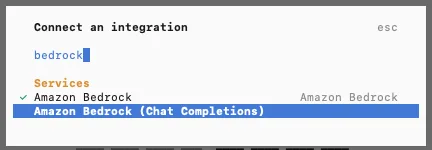
Connecting OpenCode to the Amazon Bedrock (Chat Completions) provider. Image: AWS machine learning blog (original)
Introduction - announcement of Kimi K3.1 Pro Highspeed on Amazon Bedrock
Amazon Bedrock now hosts Moonshot AI's Kimi K3.1 Pro Highspeed model. This model offers faster output and improved performance for long-horizon tasks. It is part of Moonshot AI’s new K3.1 series. The model is now available for developers to try and deploy through Amazon Bedrock.
This release makes it easier for users to access high-speed, high-quality AI models. It is designed to handle complex tasks that require sustained reasoning. The model's availability on Amazon Bedrock simplifies deployment for many applications. It also provides options for cost-efficient and region-specific use.
Model details - architecture, training, and performance improvements
Kimi K3.1 Pro Highspeed is based on a 3 trillion-parameter open-weight architecture. It is a post-trained version of Kimi K3, with the same core design. The model features a 1-million-token context window. This large context allows it to process longer inputs and maintain coherence over extended conversations or documents.
Moonshot AI trained this model with significantly more compute resources after the initial training. This extra training targets long-horizon agentic work, which involves planning and reasoning over many steps. The improvements reduce factual errors and enhance performance on professional tasks. These tasks include financial modeling, office document handling, and coding for game engines, 3D scenes, and CAD scripts.
The key benefit of these enhancements is faster output generation. Moonshot AI reports that Kimi K3.1 Pro Highspeed generates tokens at a rate two to three times faster than Kimi K3.1 Pro. This speed boost helps users complete tasks more quickly, especially in workflows that require many model calls.
Supported features - tool calling, structured output, image input, streaming
Kimi K3.1 Pro Highspeed supports a range of features that make it versatile for different applications. It can call external tools, enabling it to perform tasks like data retrieval or API calls. It also supports structured output, which helps generate data in specific formats such as JSON or XML.
Google AI Edge Gallery now supports accurate, multilingual speech recognition and natural speech synthesis entirely on device. These models run offline with low latency.
The model can process image inputs, allowing it to analyze visual data alongside text. It also supports streaming, meaning it can send output tokens as they are generated. This feature reduces perceived latency and improves user experience during interactive sessions.
All these features are available without changing the existing security posture. Data processed by the model remains within the AWS data boundary. It is not shared with Moonshot AI and is not used to train the model. Zero data retention is always enabled, and AWS operators cannot view prompts or completions during inference.
Availability and deployment - regions, endpoints, and API options
Kimi K3.1 Pro Highspeed is accessible through multiple Amazon Bedrock inference profiles. The global profile, called "global.moonshotai.kimi-k3.1," routes requests across supported AWS regions worldwide. This profile offers lower per-token costs and is recommended for most workloads.
Regional profiles are also available. The "us.moonshotai.kimi-k3.1" profile processes requests within US regions, while "in.moonshotai.kimi-k3.1" keeps processing within India regions. These profiles are suitable for workloads with data residency requirements.
Developers can access the model via the OpenAI-compatible Chat Completions API, Responses API, or Amazon Bedrock’s Converse and Invoke APIs. The Chat Completions API is recommended for most use cases. Deployment is straightforward for those already using Amazon Bedrock, requiring only a change in the model ID.
Cost options - standard and Flex tiers, cost savings, and workload suitability
Kimi K3.1 Pro Highspeed is available through two pricing tiers. The standard tier charges for each request based on token count. The Flex tier offers the same model at half the standard price. This lower cost comes with potentially longer response times.
The Flex tier is ideal for workloads where cost savings matter more than speed. Examples include model evaluations, content summarization, and background tasks in agent workflows. It allows teams to mix tiers within the same application, balancing speed and cost across different requests.
To use the Flex tier, set the service_tier parameter to "flex." This flexibility helps optimize costs for large-scale or non-time-sensitive tasks. Monitoring traffic across tiers can be done with Amazon CloudWatch, which tracks latency and usage.
Inference optimization - explicit prompt caching and latency reduction
Many applications resend large, stable prompts repeatedly, such as system instructions or reference documents. Kimi K3.1 Pro Highspeed can cache these repeated prefixes automatically. Developers can also mark specific points in prompts as cache breakpoints to improve cache hit rates.
Explicit prompt caching reduces latency and input costs. When a prefix is cached, subsequent requests reuse it instead of reprocessing it. This is especially useful for long, repetitive contexts like coding assistants or agent workflows. Cached content is stored for at least 30 minutes, and cache reads are billed at a discounted rate.
Implementing prompt caching involves adding a cache breakpoint after stable content. This approach lowers the number of tokens processed each time, speeding up responses and reducing costs.
Practical use cases - coding assistants, agent workflows, long-horizon tasks
Kimi K3.1 Pro Highspeed is well suited for coding assistants that need to generate code quickly. It can handle multiple calls in a row, which is common in agentic workflows. For example, a coding agent reads files, plans changes, tests, and fixes errors.
Faster output tokens mean the entire cycle completes sooner. This reduces waiting time between steps, making development and debugging more efficient. The model's ability to process long inputs also supports complex, long-horizon tasks that involve planning over many steps.
Other practical applications include AI-powered agents that perform structured reasoning, financial modeling, and document analysis. The high speed and extended context window enable these workflows to run more smoothly and efficiently.
How OpenSmartRoute helps - routing requests for cost and speed efficiency
OpenSmartRoute is an open-source request router for AI models. It directs each request to the best-fit model, tool, or agent from a predefined catalog. The router scores candidates based on quality, cost, speed, and safety.
Using OpenSmartRoute with Kimi K3.1 Pro Highspeed can optimize costs and response times. It can prioritize high-speed models for latency-sensitive tasks and cheaper models for background work. The router can also enforce rules, such as keeping personal data on on-premises models or within specific regions.
OpenSmartRoute learns from outcomes, adjusting traffic to models that perform well. It provides visibility into request costs and performance, helping teams manage large workloads efficiently. Integrating Kimi K3.1 Pro Highspeed into the router setup ensures requests are routed to meet both speed and cost goals.
How it compares - what existed before, what this changes and what stays the same
Before Kimi K3.1 Pro Highspeed, users could access Kimi K3 on Amazon Bedrock. That version had a 1-million-token context window and was optimized for general tasks. It was suitable for many professional and agentic workflows but had limitations in speed and long-horizon reasoning.
Kimi K3.1 Pro Highspeed builds on the original Kimi K3.1 by adding more post-training compute. This extra training targets longer tasks and reduces factual errors. It also improves performance in complex professional tasks like financial modeling, coding, and document analysis.
The main change is the increased speed. Moonshot AI reports that Kimi K3.1 Pro Highspeed generates output tokens 2 to 3 times faster than Kimi K3.1 Pro. It also supports the same features, such as tool calling, structured output, image input, and streaming. The endpoint and APIs remain the same, so existing code can switch models by changing the model ID.
What stays the same is the architecture and core capabilities. The model still uses a 3 trillion parameter open-weight architecture and a 1-million-token context window. It continues to process data securely within AWS, with zero data retention and no operator access during inference.
This update mainly affects performance and efficiency. It allows teams to run more complex workflows faster and at a lower cost per token. The model's API and features remain consistent, making adoption straightforward for existing users.
Questions this leaves open - what the source does not say and how a reader can check it
The source does not specify the exact size of the post-training compute used for Kimi K3.1 Pro Highspeed. It mentions "substantially more" compute but does not give numbers or compare it to previous versions. To understand the scale, a reader could check Moonshot AI's technical documentation or contact support.
It also does not detail the training data or the specific methods used to improve factual accuracy and long-horizon reasoning. Without this, users cannot verify how the model's performance might vary across different tasks. To evaluate this, users can run their own tests on tasks relevant to their workflows and compare the results with previous versions.
The article does not specify the licensing terms or restrictions for Kimi K3.1 Pro Highspeed. It states that the same APIs and features are supported, but does not clarify if there are any new limitations or usage policies. Users should review the licensing agreement on Amazon Bedrock or consult Moonshot AI for clarification.
Pricing details for the new model are not provided in the source. It mentions that the model costs less per token than other profiles but does not specify the exact rates. To verify costs, users can consult the Amazon Bedrock pricing page or monitor their usage through AWS billing tools.
The source does not explain how the model performs in comparison to other models outside of Kimi K3.1 Pro. For example, how it stacks up against other open-weight models or proprietary solutions is not covered. Users interested in benchmarking can run comparative tests with different models and evaluate metrics such as speed, accuracy, and cost.
It also leaves open how the model's improvements translate into real-world workflows. While it mentions professional tasks like coding and financial modeling, it does not provide concrete examples or case studies. Teams can explore this by pilot testing the model in their specific use cases and measuring performance gains.
Finally, the source does not address potential limitations or risks associated with the new model. For instance, whether the increased speed affects output quality or if there are new failure modes is not discussed. Users should perform their own validation and safety checks before deploying the model in critical applications.
To check these aspects, users can:
Review Moonshot AI's technical documentation and support channels.
Conduct internal testing on representative tasks.
Monitor costs and performance metrics during deployment.
Consult licensing and usage policies on Amazon Bedrock.
Compare results with other models to understand relative strengths and weaknesses.
This approach ensures users understand the capabilities and limitations of Kimi K3.1 Pro Highspeed before integrating it into their workflows.
What to do - steps to get started and integrate the model
To begin using Kimi K3.1 Pro Highspeed, open the Amazon Bedrock console. Choose the Test option and then the Playground. Select the Kimi K3.1 model to try it out without writing code.
For deployment in applications, change the model ID in your code to "global.moonshotai.kimi-k3.1" for global routing. Use the OpenAI SDK with the Amazon Bedrock endpoint. You will need an AWS account with permissions to invoke the model.
Set up your environment with Python 3.11 or later, and install the required SDKs. Use the provided example code to create bearer tokens and send requests. Adjust the reasoning effort setting to control latency and output size.
For cost savings, consider switching to the Flex tier by setting the appropriate parameter. Test different tiers and monitor latency and costs with Amazon CloudWatch. You can also enable explicit prompt caching to speed up repeated requests.
OpenSmartRoute can help manage and optimize your requests across models and tiers. It ensures your workloads balance speed and cost according to your needs. To get started, review the model's regional availability and pricing details.