Answers from the documentation; checking which model is on duty
Hi - I answer from the OpenSmartRoute documentation: routing, the API, plans and quotas, self-hosting. Ask away, or open a support ticket if you need a person.
Grounded in the docs - follow a source before acting on it.
Migrate to Amazon Bedrock Managed Knowledge Base with a new guided pro - OpenSmartRoute
Migrate to Amazon Bedrock Managed Knowledge Base with a new guided process
Amazon Bedrock now offers a Managed Knowledge Base that simplifies ingestion, storage, and retrieval. A migration guide helps move existing knowledge bases smoothly.
Key points
Managed Knowledge Base scales automatically with content growth
Supports up to 200 data sources per knowledge base
Pricing is based on storage and retrieval usage
Migration guide uses read-only discovery and step-by-step planning
Why it matters: Simplifies management and reduces costs by automating ingestion, storage, and retrieval processes.
By OpenSmartRoute editorial · written through the router by llm-small
From AWS machine learning blog - “Migrate to Amazon Bedrock Managed Knowledge Base with your coding agent”
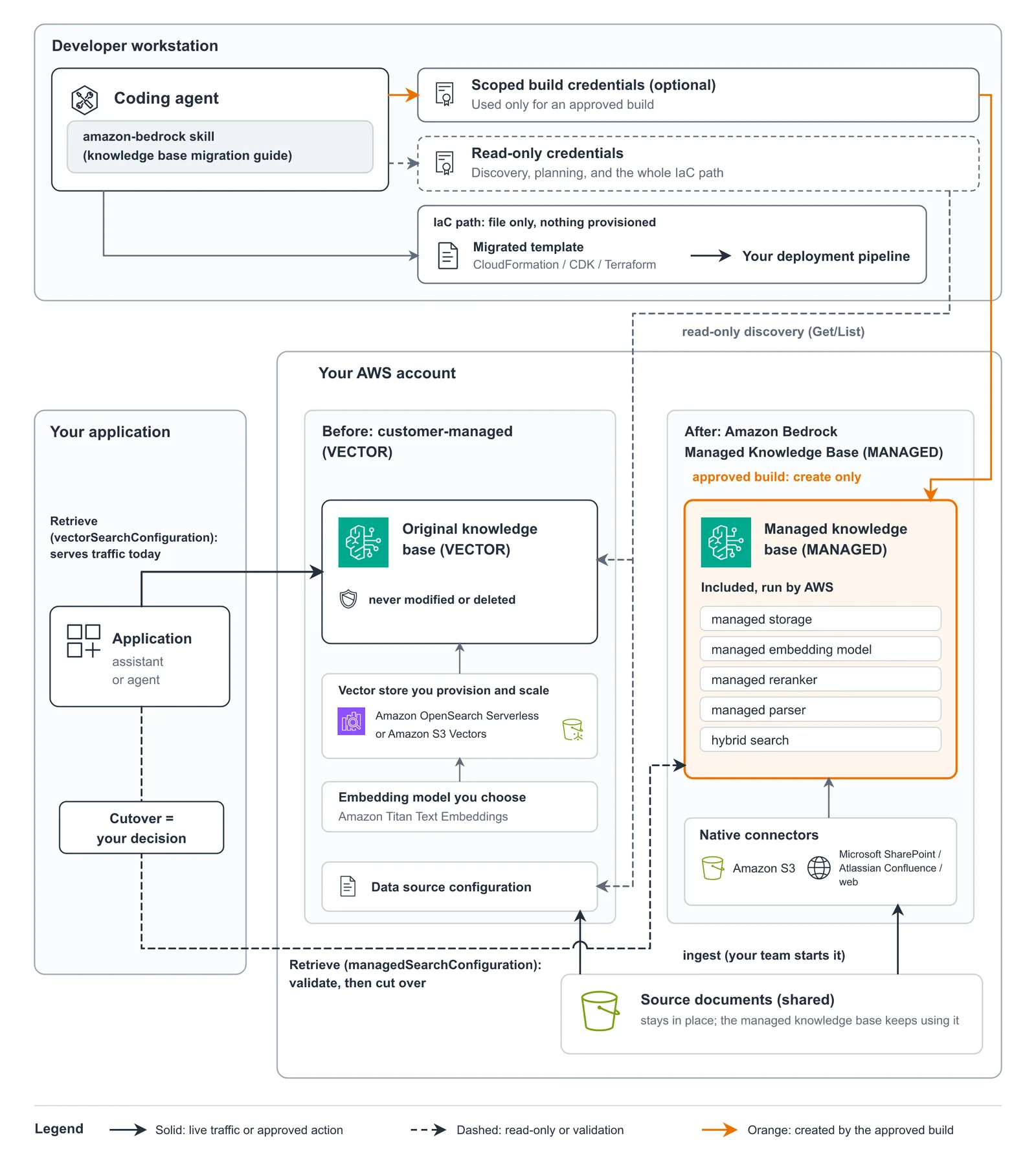
Flow diagram of a coding agent creating a MANAGED knowledge base alongside the original VECTOR knowledge base, which keeps serving the application until the team validates retrieval and cuts over.. Image: AWS machine learning blog (original)
Introduction - Announcing the migration to Managed Knowledge Base
Amazon Bedrock now offers a Managed Knowledge Base feature. This new service simplifies the process of managing large collections of knowledge content. It replaces the need for teams to provision, tune, and scale their own vector stores. The migration guide helps users move existing knowledge bases smoothly to this new service.
This change means teams can focus more on their applications rather than managing infrastructure. The Managed Knowledge Base takes over tasks like ingestion, storage, and retrieval. It also adds new capabilities for more accurate and flexible search. The guide provides step-by-step instructions to make migration easier and safer.
What is Managed Knowledge Base - Features and capabilities
The Managed Knowledge Base is a service that handles all aspects of knowledge storage and retrieval. It automatically scales as content grows, removing the need for manual capacity planning. It supports hybrid search, which combines keyword and semantic matching. This feature is always active and requires no index configuration.
The knowledge base includes a managed embedding model, a reranker, and a parser for multimodal files. You can still bring your own embedding model if you prefer. On each retrieval request, you can select the managed reranker, a custom reranking model, or no reranking. This flexibility helps improve search accuracy.
It connects directly to data sources like Amazon S3, Microsoft SharePoint, and Atlassian Confluence. After the initial sync, updates only process changed content. The service also protects against accidental deletion with safeguards. It respects document permissions, returning only content the user can access. Real-time permission checks are supported for some connectors.
The Managed Knowledge Base supports agentic retrieval, which answers complex, multi-part questions. It can search multiple knowledge bases in one request. Integration with Amazon Bedrock AgentCore Gateway allows querying via the Model Context Protocol. This setup enables secure, cross-account access with resource-based policies.
Google AI releases A2UI 1.0, an open protocol enabling agents to display interactive, native UI across platforms, improving user experience and developer flexibility.
Moonshot AI's Kimi K3.1 Pro Highspeed is now on Amazon Bedrock, offering higher speed and improved performance for long-horizon tasks.
Why migrate - Benefits over customer-managed knowledge bases
Moving to a Managed Knowledge Base offers several advantages. It reduces the complexity of managing infrastructure, as Amazon Bedrock handles ingestion, storage, indexing, and retrieval. The service scales automatically, so teams do not need to provision or tune resources manually.
Cost is another benefit. With a customer-managed knowledge base, costs depend on the vector store chosen and its provisioning. Storage and retrieval charges vary based on usage. In contrast, the Managed Knowledge Base charges are based on what content is stored and retrieved, making costs more predictable and aligned with actual use.
The managed service also includes features that are difficult to build independently. These include native connectors, ACL awareness, real-time permission checks, and agentic retrieval. These capabilities help ensure secure, accurate, and flexible search experiences. They also reduce the operational burden on teams, allowing them to focus on application development.
Teams that migrate can improve search quality and reduce maintenance effort. The service's automatic scaling and built-in features support growing content volumes without additional work. Cost management becomes easier with usage-based pricing, especially for low-utilization knowledge bases.
Prerequisites - Requirements for migration
Before starting migration, teams need a compatible development environment. Python 3 with the boto3 library is required to run the provisioning scripts. Access to the original knowledge base configuration or its Infrastructure as Code (IaC) files is necessary for planning.
A least-privilege, read-only profile for AWS CLI must be configured. This profile allows the agent to discover current settings without making changes. The team also needs an IAM service role for the new knowledge base, with trust policies and permissions provided by the guide.
Access to the existing knowledge base or its configuration files helps the agent read current settings and data sources. This information is crucial for planning the migration and ensuring a smooth transition. Teams should also prepare a scoped build profile with the recommended IAM policies to limit permissions.
Teams should verify they have access to the AWS account and region where the knowledge base resides. The migration guide supports a staged approach, so teams can validate each step before proceeding. This careful planning reduces risks and ensures data integrity.
Installation - Setting up the Agent Toolkit for AWS
To begin, teams must install the Agent Toolkit for AWS. This toolkit includes the skills needed to run the migration guide and manage the process. It works with compatible development environments and is available on GitHub.
The toolkit requires Python 3 and the boto3 library. Once installed, it provides a set of skills for discovery, planning, and implementation. These skills enable the agent to read current configurations, generate migration plans, and create new resources.
Teams should configure the AWS CLI with a least-privilege profile. This profile allows the agent to perform read-only discovery tasks. For resource creation, a separate scoped profile with the necessary permissions is recommended. Proper setup ensures the agent can operate securely and efficiently.
The toolkit also includes example scripts and templates to help automate parts of the migration. Teams can customize these scripts to fit their specific environment. The installation process is straightforward, but reviewing the documentation helps ensure all prerequisites are met.
Planning the migration - Using the guide to prepare
The migration guide helps teams plan each step of moving to the Managed Knowledge Base. It starts by answering questions about the current setup and desired outcomes. The guide can operate in Explore mode, where it provides read-only insights about the existing knowledge base.
In Migration mode, the guide walks the agent through checkpoints. These include confirming account details, discovering current configurations, and reviewing the migration plan. The agent reads the current knowledge base and data sources, then generates a detailed plan.
The plan shows which settings can stay the same, which need adjustment, and which are blocked. It also compares chunking, permissions, and other configurations. Teams review the plan and application changes before approving. This process ensures transparency and control.
The guide can generate Infrastructure as Code (IaC) templates for automated deployment. It also provides a preview of the provisioning scripts. Teams can approve or modify these scripts before execution. This staged approach minimizes errors and allows validation at each step.
Updating the application - Changing retrieval calls
After the new Managed Knowledge Base is created, teams must update their applications. The retrieval calls need to point to the new service endpoint. This change involves modifying the application's code to use the updated API or SDK calls.
The migration guide helps identify the necessary changes. It recommends testing retrieval requests against the new knowledge base before switching traffic. This validation ensures that the search results meet expectations and that the integration is correct.
Teams should verify that permissions, filters, and chunking settings are correctly applied. They can compare results from the old and new knowledge bases to confirm accuracy. Once satisfied, they can plan the cutover to direct all traffic to the Managed Knowledge Base.
Updating the application may also involve adjusting query parameters or reranking options. The guide provides guidance on these settings. Proper testing reduces the risk of disruptions and ensures a smooth transition.
Validation - Ensuring correct retrieval before cutover
Validation is a critical step before fully switching to the Managed Knowledge Base. Teams should run a series of test queries to compare results from the old and new systems. This helps confirm that the new setup retrieves relevant and accurate information.
The guide recommends reviewing chunking, permissions, and filters during validation. It also suggests checking the handling of multi-part questions and complex queries. These tests ensure that the new knowledge base performs as expected in real use cases.
Teams should monitor the retrieval times and accuracy scores. If any issues arise, they can adjust settings or refine the data ingestion process. Validation helps catch problems early, avoiding disruptions during full cutover.
Once the team is confident in the results, they can plan the final switch. This involves redirecting all traffic from the old knowledge base to the Managed Knowledge Base. The validation process minimizes risks and ensures a seamless transition for users.
How OpenSmartRoute helps - Supporting migration planning and execution
OpenSmartRoute is an open-source router for AI requests. It sends each request to the best-fit model, agent, or tool from a team-defined catalog. It scores candidates based on quality, cost, speed, and safety, with team-set weights.
During migration, OpenSmartRoute can help optimize request routing to the new Managed Knowledge Base. It ensures that queries are directed to the most appropriate model or agent, based on current goals and constraints. This improves search accuracy and cost efficiency.
The platform supports complex routing rules, including region, cost caps, and safety filters. It learns from outcomes, increasing traffic to well-performing models and reducing it for less accurate ones. This adaptive routing helps teams get the best results from their knowledge base.
OpenSmartRoute also provides a savings ledger that shows the cost of each routed request. It detects prompt injection and personal data, helping maintain safety and compliance. The tool can measure routing accuracy and fail builds if quality drops. It integrates smoothly with the migration process, supporting validation and testing.
Google AI Edge Gallery now supports accurate, multilingual speech recognition and natural speech synthesis entirely on device. These models run offline with low latency.